ERC-20 Precompile
ERC20 Precompile Address Converter
Convert asset IDs and foreign asset indexes to ERC20 precompile addresses
Introduction
The ERC-20 precompile provides a standard ERC-20 token interface for interacting with assets managed by the Assets pallet, helping smart contracts on chains running pallet-revive interact with native assets using familiar Ethereum-style ERC-20 calls. A runtime can register one ERC-20 precompile per Assets pallet instance, each with its own address suffix.
Each asset is mapped to a unique precompile address based on its asset ID or foreign asset index. The precompile implements core ERC-20 functionality:
- Token transfers: Send assets between accounts using standard
transferandtransferFrommethods. - Approvals and allowances: Manage spending permissions with
approveandallowance. - Balance queries: Check token balances with
balanceOfand total supply withtotalSupply.
Supported Asset Types
The address suffixes on this page (01200000, 02200000, and 03200000) are runtime configuration: each runtime chooses which Assets pallet instances get an ERC-20 precompile and which suffix each one uses. The following sections describe the three asset categories and suffixes used by the Polkadot Hub runtime. For the asset IDs registered on Polkadot Hub, see the ERC-20 precompile page on developers.polkadot.com.
Trust-Backed Assets
Trust-Backed Assets are created directly in the Assets pallet and assigned a u32 asset ID.
- Address suffix:
01200000 - Address format:
0x+ assetId (8 hex digits, zero-padded) + 24 zero digits +01200000 - Example: Asset ID
1984→0x000007C000000000000000000000000001200000
Foreign Assets
Foreign Assets originate from other chains and are identified on-chain by their XCM Location. The ERC-20 precompile uses a u32 index, not the XCM Location directly, to derive the precompile address.
- Address suffix:
02200000 - Address format:
0x+ foreignAssetIndex (8 hex digits, zero-padded) + 24 zero digits +02200000 - Example: Foreign Asset Index
0→0x0000000000000000000000000000000002200000
Deriving the Foreign Asset Index
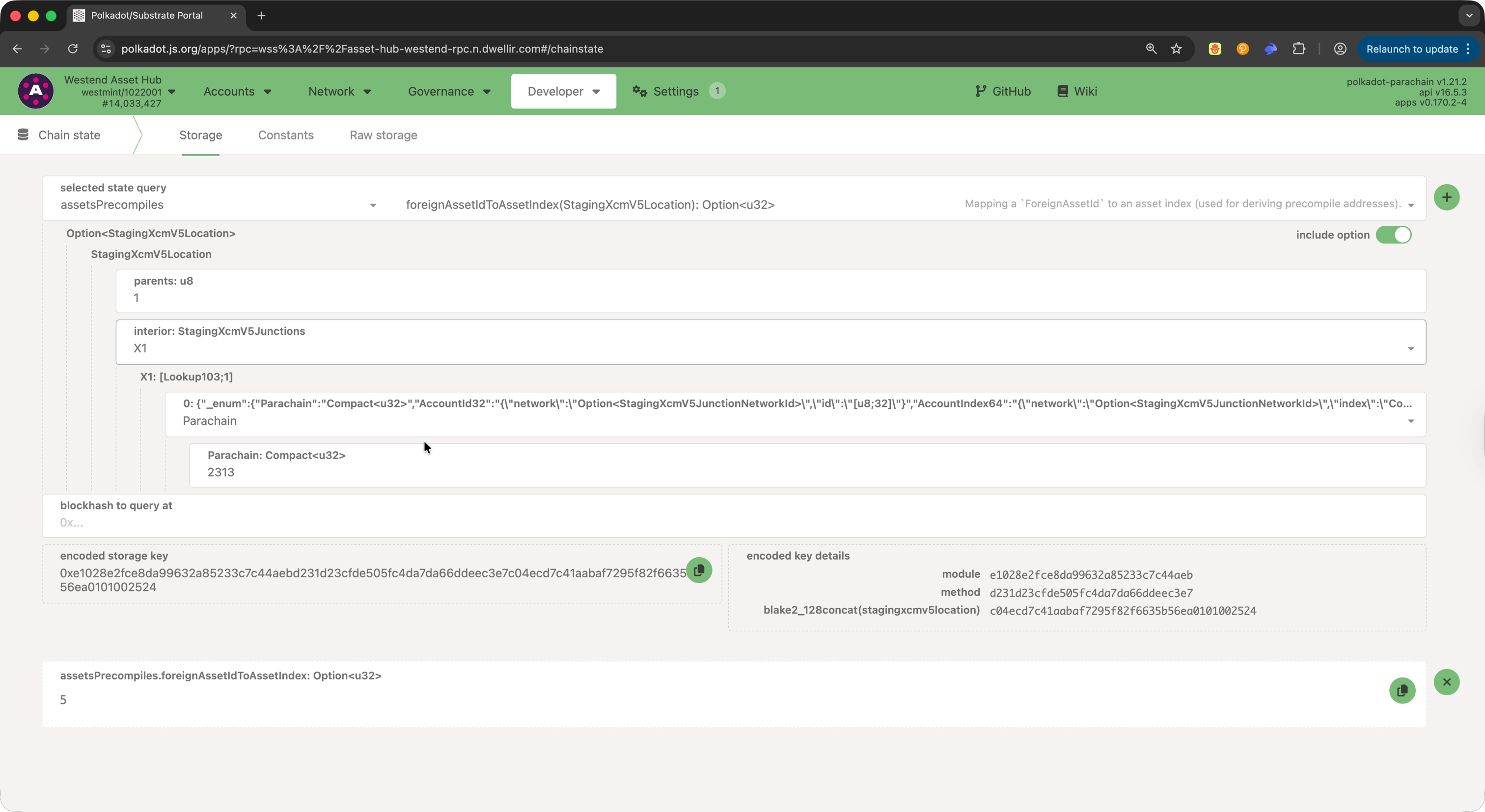
Since foreign asset IDs are XCM Locations (not simple integers), the runtime assigns each foreign asset a sequential u32 index when it is registered. To derive the ERC-20 precompile address for a foreign asset, follow these steps:
- Get the XCM location of the foreign asset (for example,
{ parents: 1, interior: X1(Parachain(2313)) }). -
Query the index in Polkadot.js Apps:
- Navigate to Developer > Chain State.
- Select assetsPrecompiles from the module dropdown.
- Select foreignAssetIdToAssetIndex from the call dropdown.
- Pass the XCM Location and note the returned u32 value (for example,
5).
-
Enter that u32 index into the Foreign Asset mode of the converter above to derive the ERC-20 precompile address.
Pool Assets
Pool Assets are created by liquidity pool operations and assigned a u32 asset ID.
- Address suffix:
03200000 - Address format:
0x+ assetId (8 hex digits, zero-padded) + 24 zero digits +03200000 - Example: Pool Asset ID
0→0x0000000000000000000000000000000003200000
Precompile Interface
The ERC-20 precompile implements a subset of the standard ERC-20 interface. The following functions are available:
// SPDX-License-Identifier: MIT
pragma solidity ^0.8.0;

interface IERC20 {
    // Implemented functions
    function totalSupply() external view returns (uint256);
    function transfer(address to, uint256 amount) external returns (bool);
    function balanceOf(address account) external view returns (uint256);
    function allowance(address owner, address spender) external view returns (uint256);
    function approve(address spender, uint256 amount) external returns (bool);
    function transferFrom(address from, address to, uint256 amount) external returns (bool);
}
Metadata Functions Not Available
The optional ERC-20 metadata functions (name(), symbol(), decimals()) are not implemented in this precompile. These functions are only available through the Assets pallet's storage, not via the ERC-20 interface.
Query Functions
Get Total Supply
Returns the total number of tokens in circulation for this asset.
Returns:
uint256: The total supply of tokens
Example usage:
IERC20 token = IERC20(0x000007C000000000000000000000000001200000);
uint256 supply = token.totalSupply();
Get Balance
Returns the token balance of a specific account address.
Parameters:
account: The address to query
Returns:
uint256: The token balance of the account
Example usage:
IERC20 token = IERC20(0x000007C000000000000000000000000001200000);
address user = 0x1234567890123456789012345678901234567890;
uint256 balance = token.balanceOf(user);
Check Allowance
Returns the amount of tokens that the spender is allowed to spend on behalf of the owner.
Parameters:
owner: The account that owns the tokensspender: The account authorized to spend
Returns:
uint256: The remaining allowance
Example usage:
IERC20 token = IERC20(0x000007C000000000000000000000000001200000);
address owner = 0x1111111111111111111111111111111111111111;
address spender = 0x2222222222222222222222222222222222222222;
uint256 remaining = token.allowance(owner, spender);
Token Operations
Transfer Tokens
Transfers tokens from the caller's account to the recipient address.
Parameters:
to: The recipient addressamount: The amount of tokens to transfer
Returns:
bool:trueif the transfer was successful
Example usage:
IERC20 token = IERC20(0x000007C000000000000000000000000001200000);
address recipient = 0x3333333333333333333333333333333333333333;
uint256 amount = 1000 * 10**10; // Assuming 10 decimals

bool success = token.transfer(recipient, amount);
require(success, "Transfer failed");
Warning
The transfer will fail if the caller doesn't have sufficient balance.
Approve Spending
Approves the spender to withdraw up to a specified amount from the caller's account.
Parameters:
spender: The address authorized to spend tokensamount: The maximum amount the spender can withdraw
Returns:
bool:trueif the approval was successful
Example usage:
IERC20 token = IERC20(0x000007C000000000000000000000000001200000);
address spender = 0x4444444444444444444444444444444444444444;
uint256 amount = 500 * 10**10;

bool success = token.approve(spender, amount);
require(success, "Approval failed");
Transfer From
Transfers tokens from one account to another using the allowance mechanism. The caller must have sufficient allowance from the from account.
Parameters:
from: The account to transfer fromto: The recipient addressamount: The amount of tokens to transfer
Returns:
bool:trueif the transfer was successful
Example usage:
IERC20 token = IERC20(0x000007C000000000000000000000000001200000);
address owner = 0x5555555555555555555555555555555555555555;
address recipient = 0x6666666666666666666666666666666666666666;
uint256 amount = 250 * 10**10;

bool success = token.transferFrom(owner, recipient, amount);
require(success, "Transfer from failed");
For the complete implementation, refer to the ERC-20 precompile source code in the Polkadot SDK.
Interact with the ERC-20 Precompile
To interact with the ERC-20 precompile in Remix IDE:
- Create a new file called
IERC20-precompile.solin Remix -
Copy and paste the
IERC20interface code shown above into the file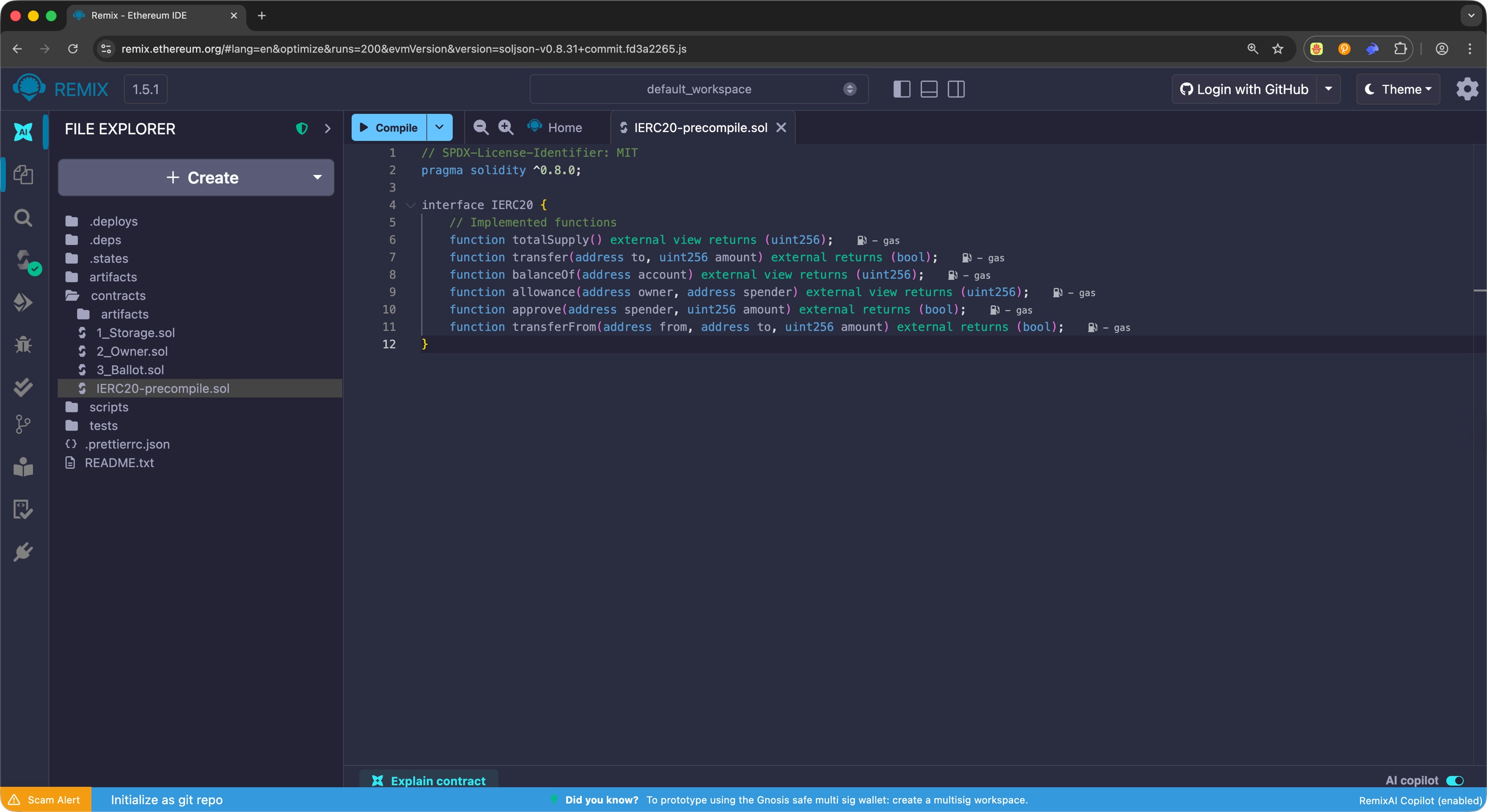
-
Compile the interface by selecting the compile button or using Ctrl + S
-
Calculate the ERC-20 precompile address for your asset using the converter above. Select the appropriate asset type (Trust-Backed, Foreign, or Pool), then enter the asset ID or foreign asset index.
- Trust-Backed example: Asset ID
1984→0x000007C000000000000000000000000001200000 - Foreign Asset example: Foreign Asset Index
0→0x0000000000000000000000000000000002200000
- Trust-Backed example: Asset ID
-
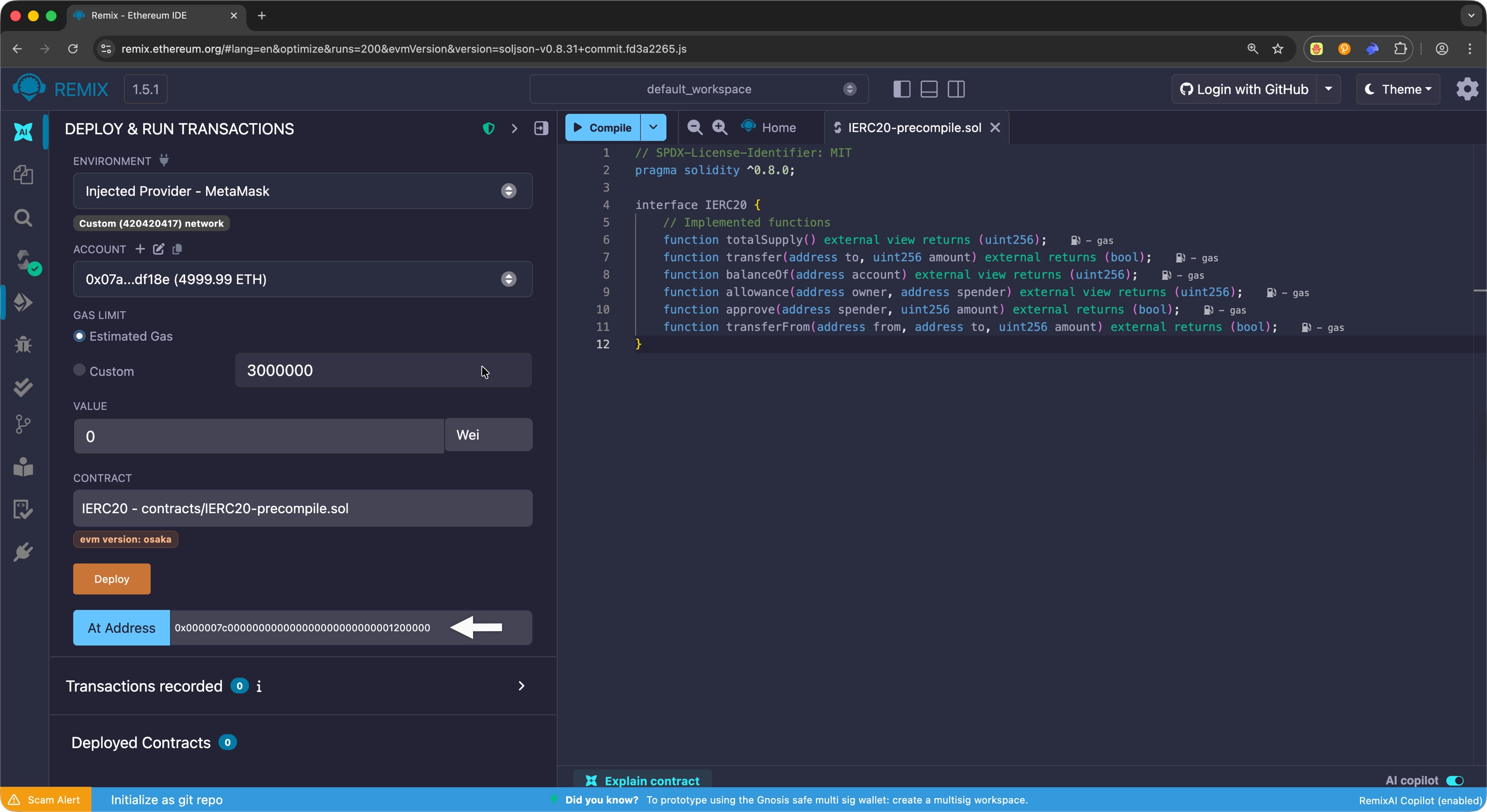
In the Deploy & Run Transactions tab, select the
IERC20interface from the contract dropdown - Enter the calculated precompile address in the At Address input field
-
Select the At Address button to connect to the precompile
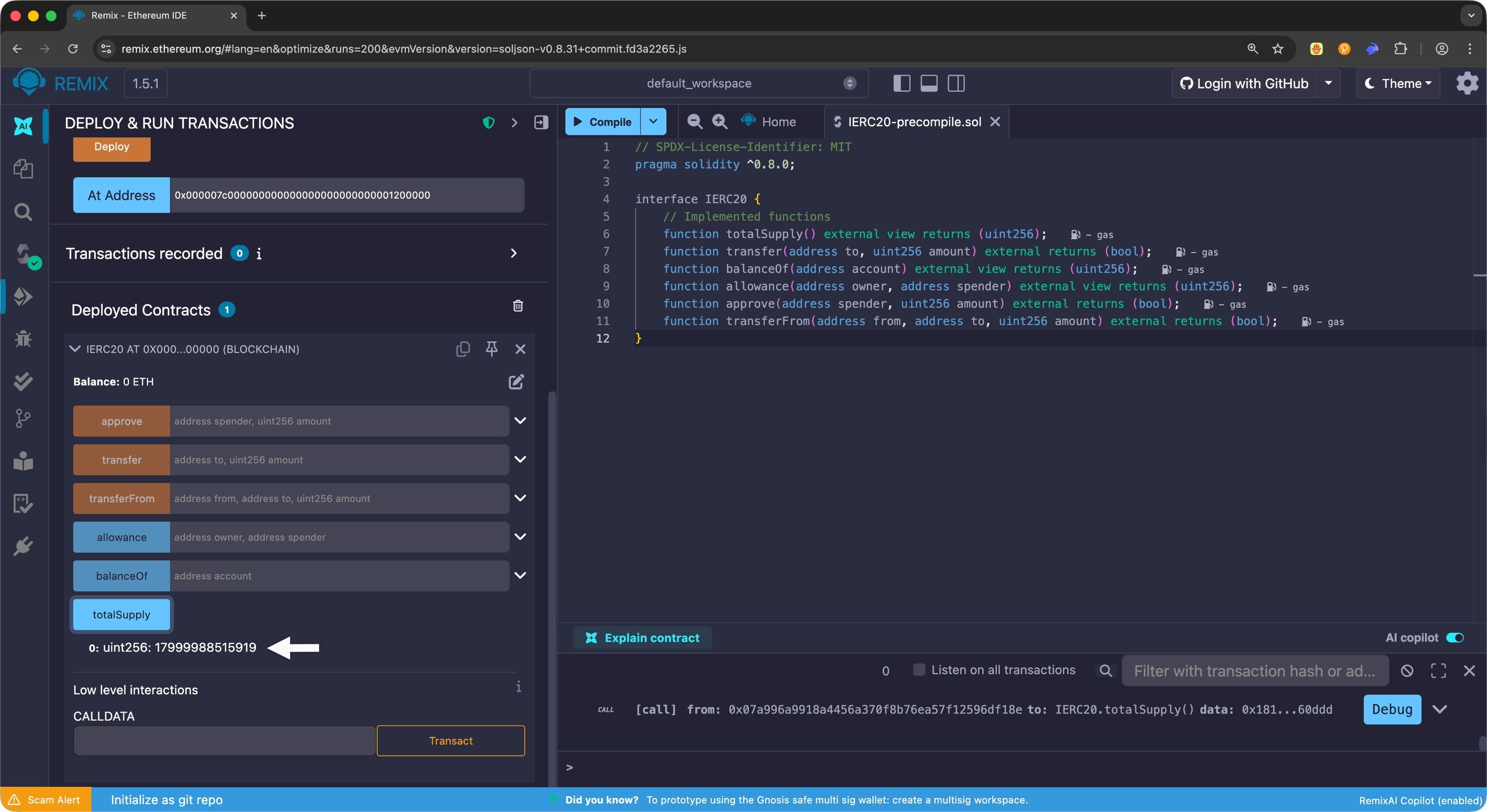
Once connected, you can interact with any of the ERC-20 precompile functions directly through the Remix interface.
Conclusion
The ERC-20 precompile connects native asset management in the Assets pallet with Ethereum's familiar token standard. By mapping asset IDs to deterministic precompile addresses, developers can interact with native Polkadot assets using standard ERC-20 interfaces.
Whether you're building DeFi protocols, token swaps, or any application requiring asset interactions, the ERC-20 precompile lets you work with native assets using the same tools and patterns as in Ethereum development.
Reference
| Created: January 29, 2026